
Mag-sign Up

Continue with Facebook
Continue with Google
o gamitin

May isang account? Mag-sign in ngayon

Mag-sign In

Continue with Facebook
Continue with Google
o gamitin

Nakalimutan ang password?

Walang account, Mag-sign up dito

Nakalimutan ang password

Nawala ang iyong password? Mangyaring ipasok ang iyong email address. Makakatanggap ka ng isang link at lilikha ng isang bagong password sa pamamagitan ng email.

May isang account? Mag-sign in ngayon

Dapat kang mag-login upang magtanong.

Continue with Facebook
Continue with Google
o gamitin

Nakalimutan ang password?

Kailangan ng account, Mag-sign up dito
Mag-sign InMag-sign Up

DCOM Money Express

DCOM Money Express Logo DCOM Money Express Logo

DCOM Money Express Nabigasyon

  • TagalogTagalog
    • Tiếng ViệtTiếng Việt
    • 日本語日本語
    • EnglishEnglish
    • TagalogTagalog
    • Bahasa IndonesiaBahasa Indonesia
Maghanap
Ask a Question

Mobile menu

Isara
Magtanong
  • HOMEPAGE
  • Bagong Member
  • DCOM Card
  • DCOM App
  • Settings ng OTP at Password
  • Service Fee at Exchange Rate
  • Remittance Statement
  • Send Money – Pera Padala
  • Receive Money – Pagtanggap
  • Send Additional Documents
  • At Iba Pang Guide
  • TagalogTagalog
    • Tiếng ViệtTiếng Việt
    • 日本語日本語
    • EnglishEnglish
    • TagalogTagalog
    • Bahasa IndonesiaBahasa Indonesia
Bahay/ Topic/Q 104896
DCOM Filipino Help Center

DCOM Filipino Help Center

  • 37 Mga Katanungan
  • 75 Mga sagot
  • 1 Pinakamahusay na sagot
  • 321 Puntos
Tingnan ang Profile
  • 0
DCOM Filipino Help Center
Posted: 26-02-20242024-02-26T00:42:39+09:00 2024-02-26T00:42:39+09:00

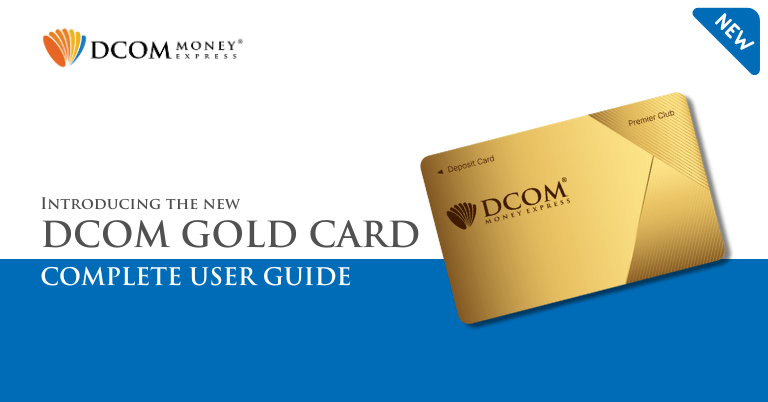
Seamless Sending, Instant Savings: Introducing the Next Generation DCOM Cards!

Share
  • Facebook

  • 0

Unlock a World of Convenience, meet the New DCOM Premier Club Card.

Global Remittance, Reimagined. Experience total freedom with the NEW DCOM Card. Thanks to our partnership with Lawson Bank, you can now send money home from over 13,500 ATMs anytime, 24/7.

We aren’t just making it easier; we’re making it cheaper. Enjoy the lowest ATM fees in Japan and keep more of your hard-earned money where it belongs. Fast. Affordable. Nationwide. Your world just got smaller.

Here’s what you need to know about the newest DCOM Card:

  • ATM Fee
  • How to Deposit
  • How to withdraw cash
  • Set your PIN (for withdrawal)
  • Change your PIN
  • How to block cards
  • How to Reactivate your card

1. ATM Fee

ATM Fee: ¥150 per transaction (up to ¥500,000 per deposit)
Withdrawal Fee: ¥250 per transaction (up to ¥200,000 per withdrawal)
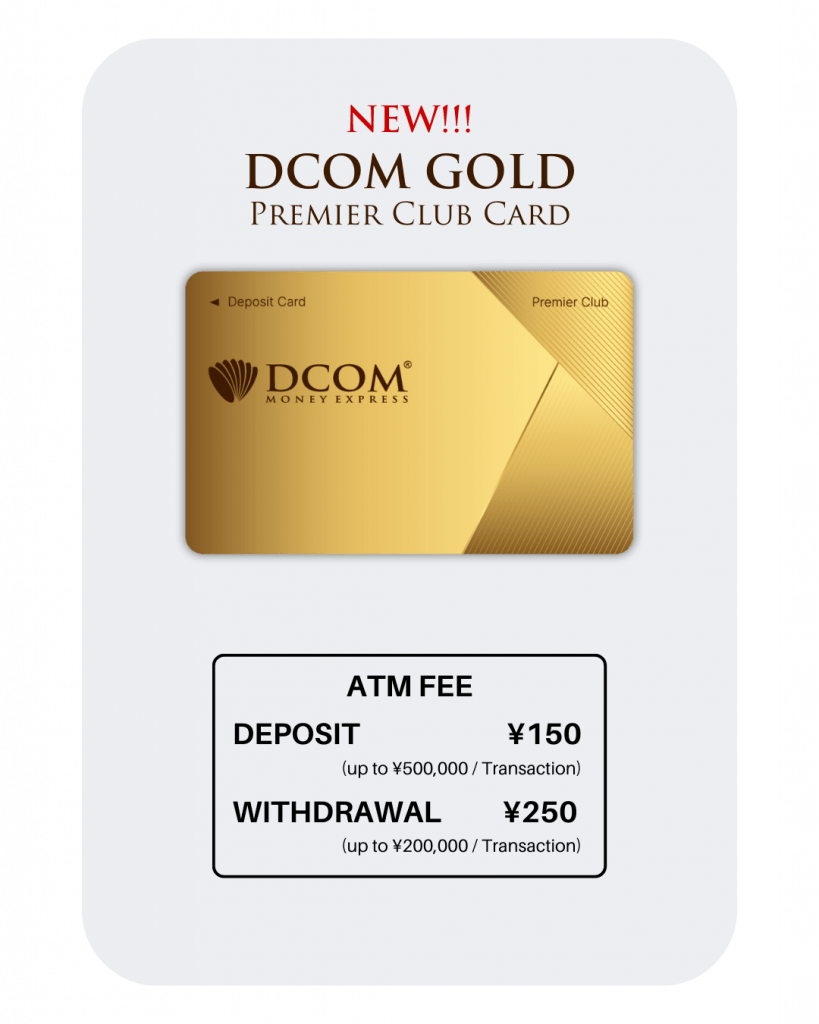
New DCOM Gold Card details

2. How to Deposit using Lawson ATMs

This card is exclusive for use at Lawson ATMs across Japan.

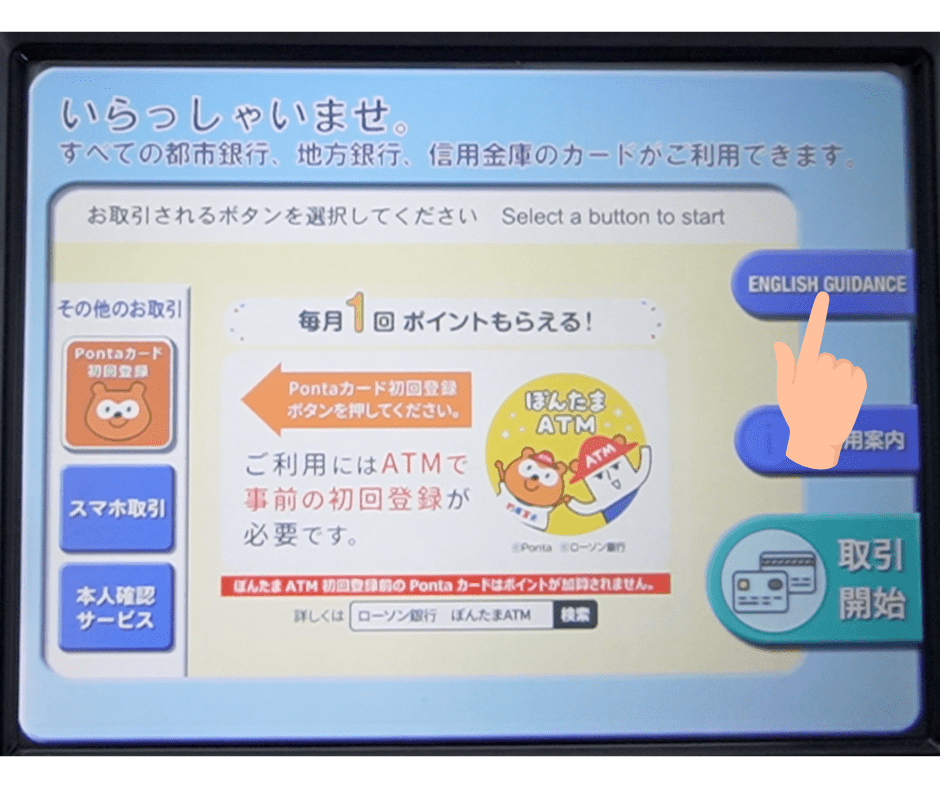
2.1 Start: Tap the “English Guide” button on the screen.
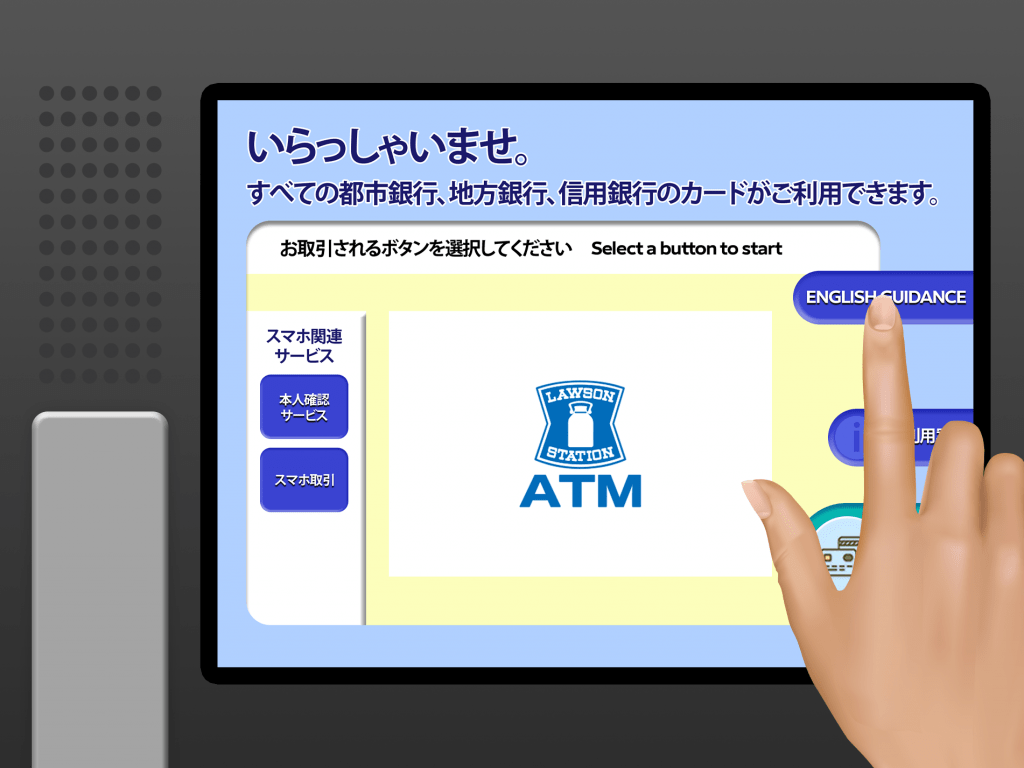
You can choose english or if you prefer Japanese, just click 取引開始

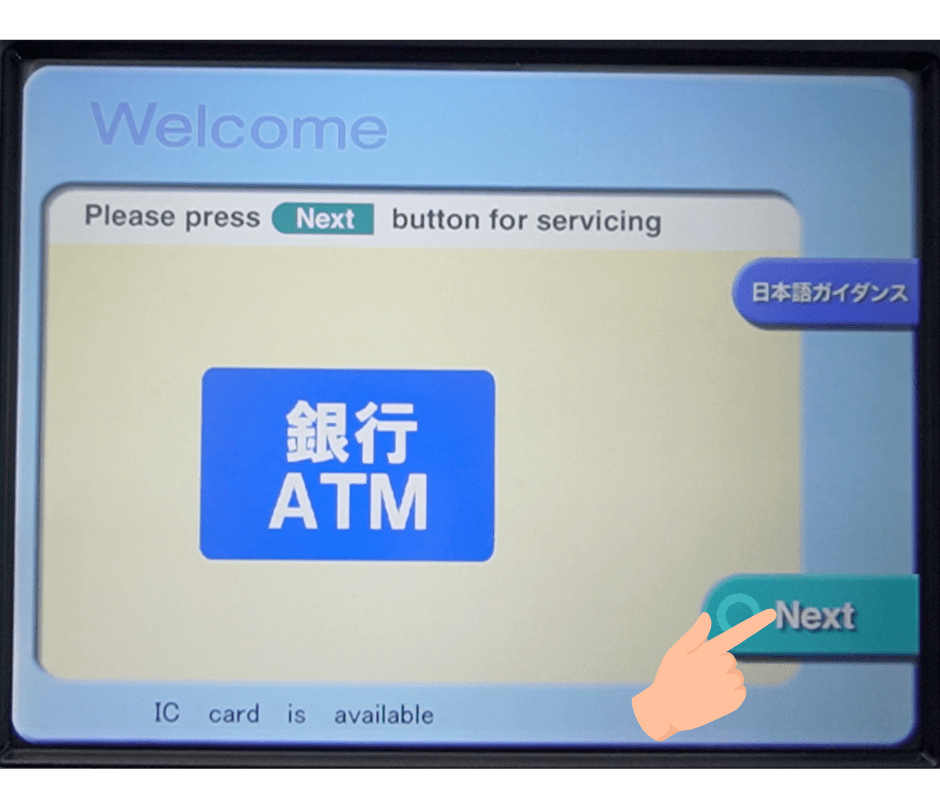
2.2 Proceed: Click “Next” to continue.
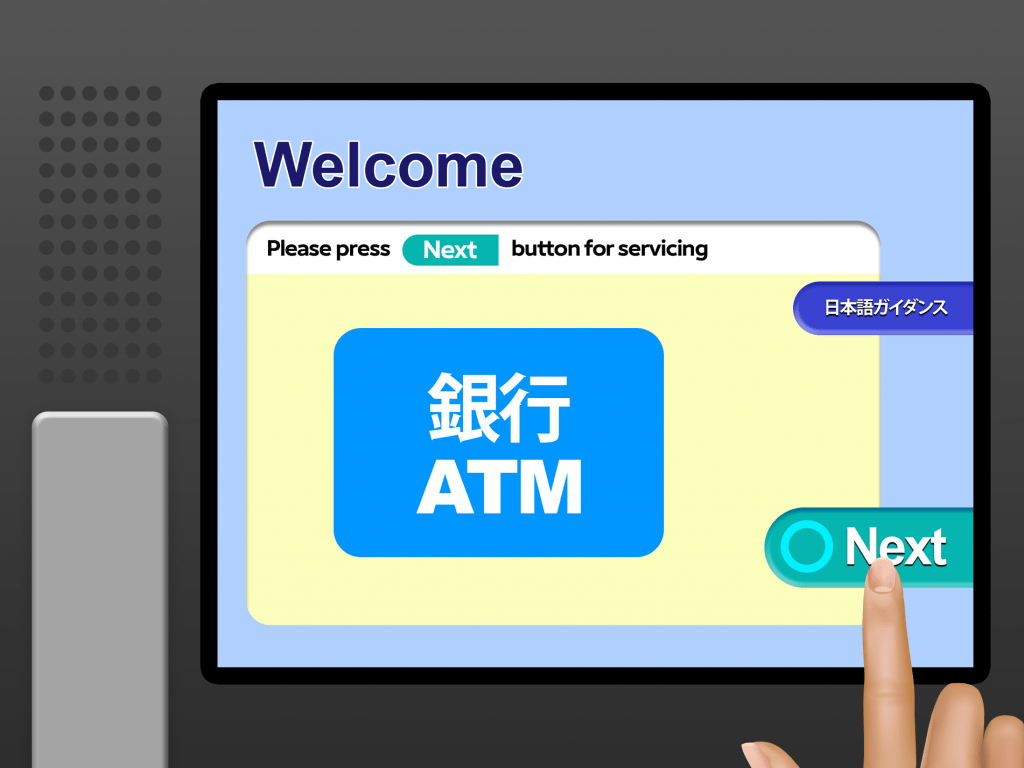
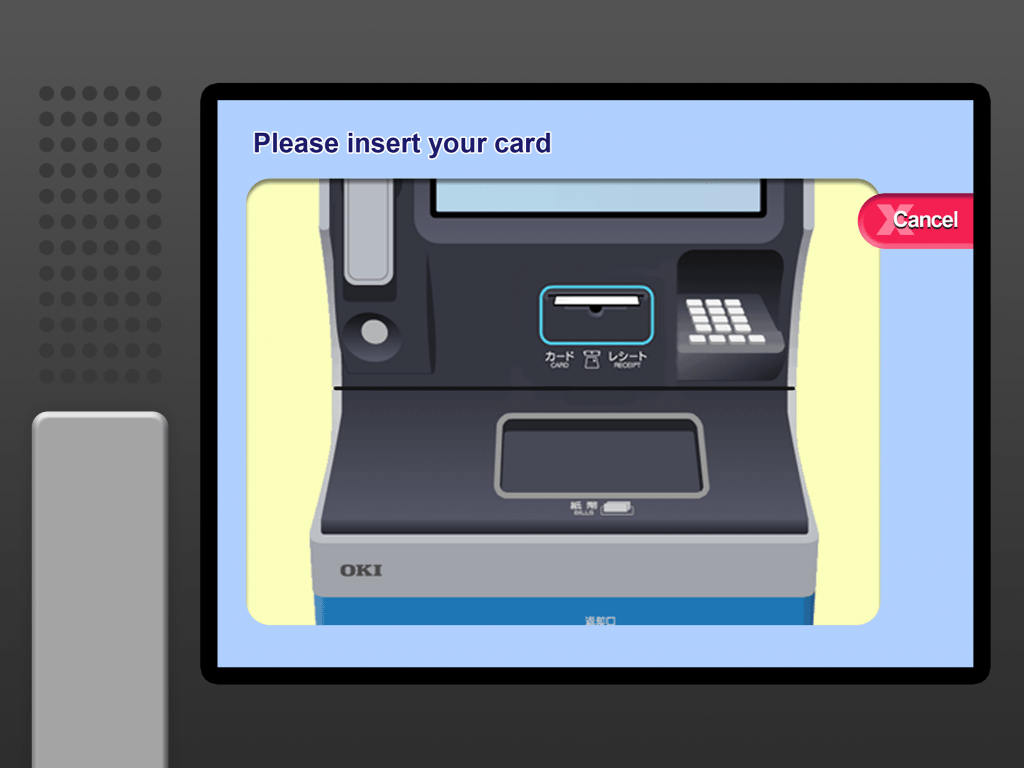
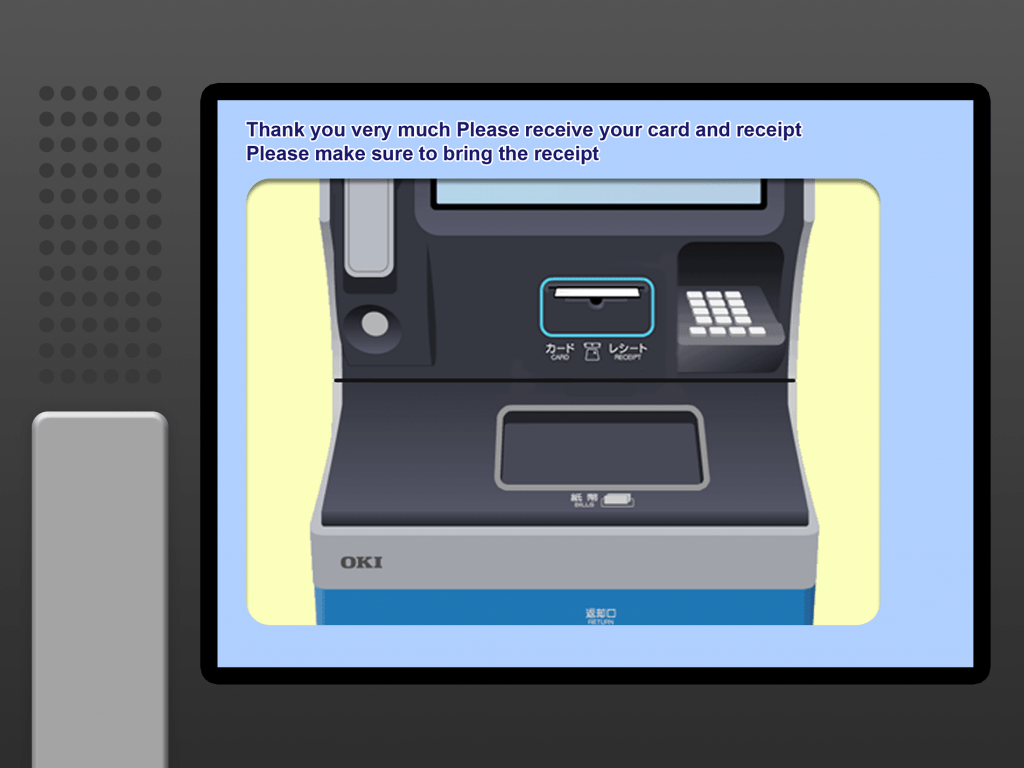
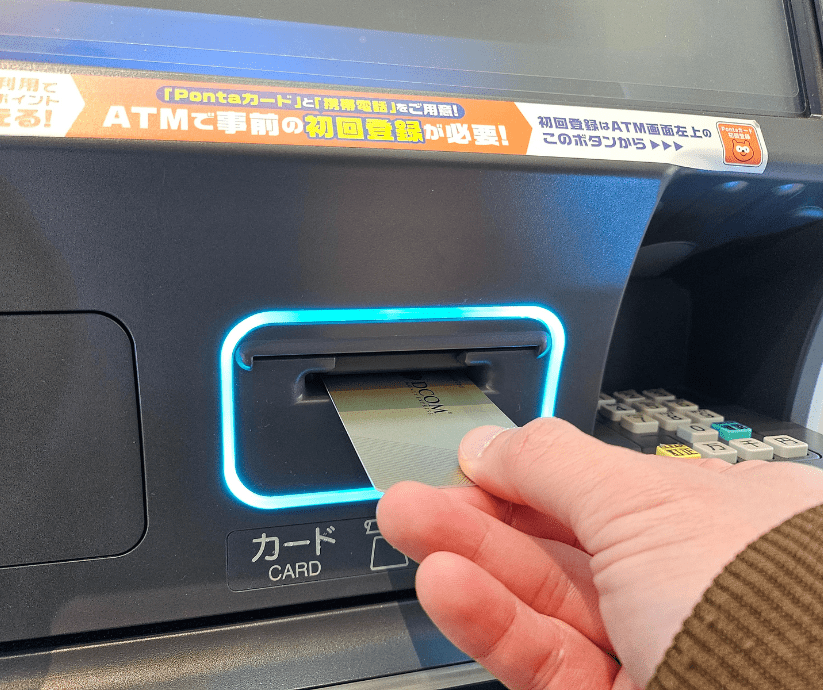
2.3 Insert Card: Slide your DCOM Card into the machine.
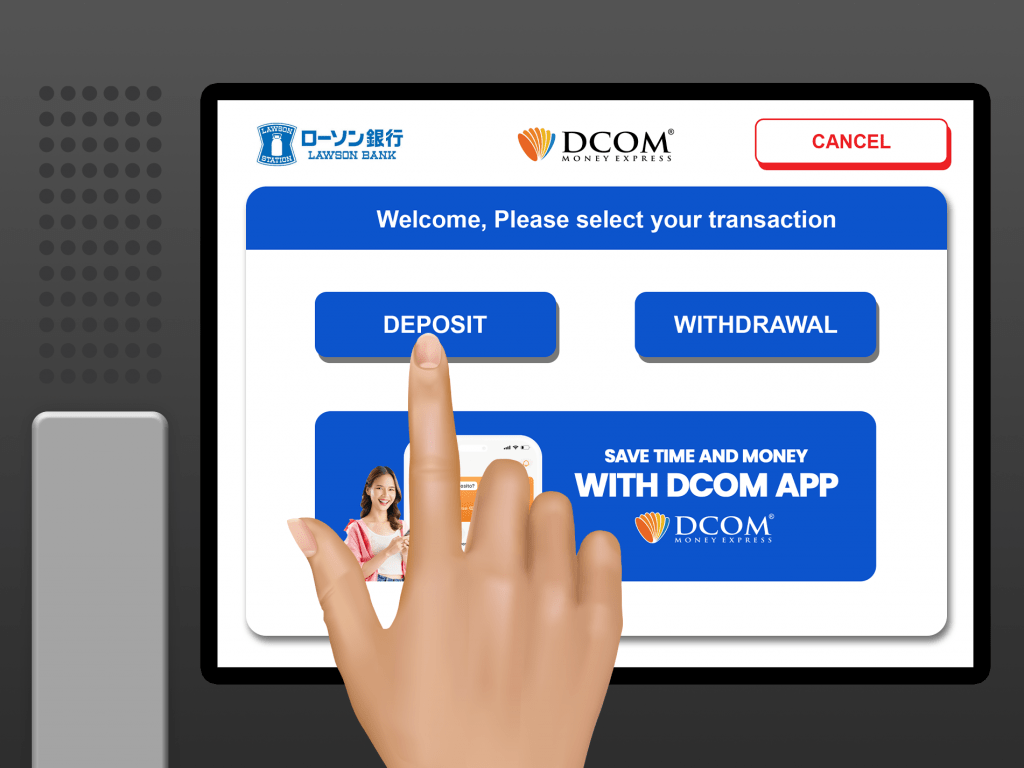
2.4 Click “Deposit”
2.5 Insert the cash you wish to Deposit
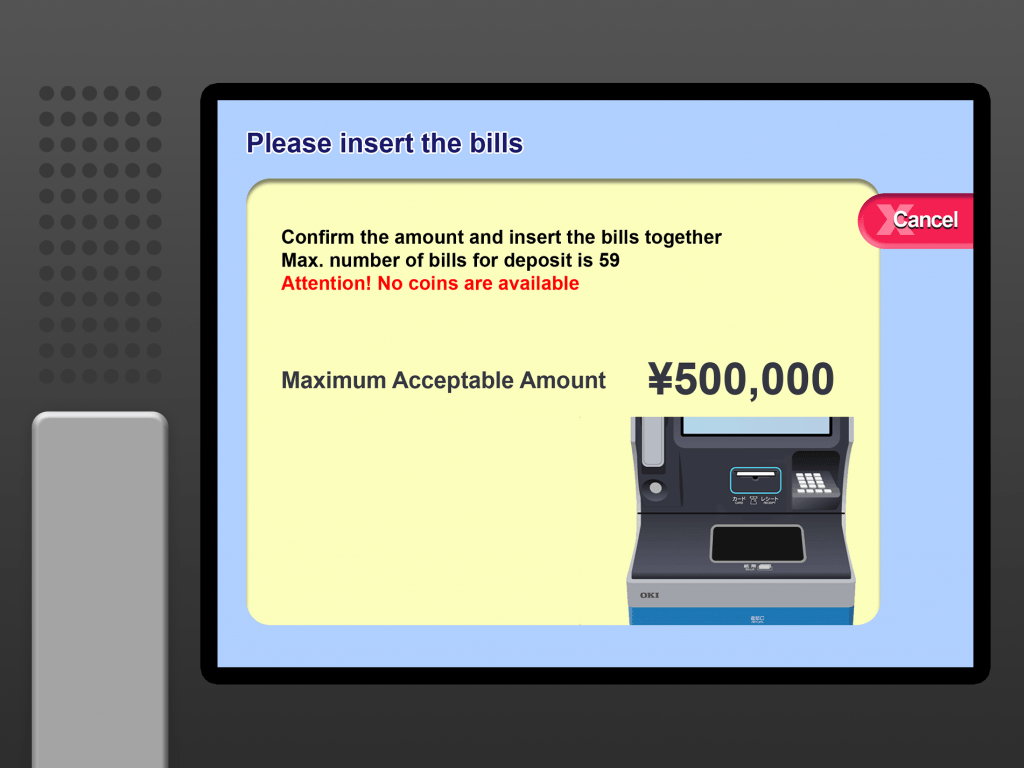
Please note that the machine doesn’t accept coins

2.6 Check the details and click “Confirm” twice
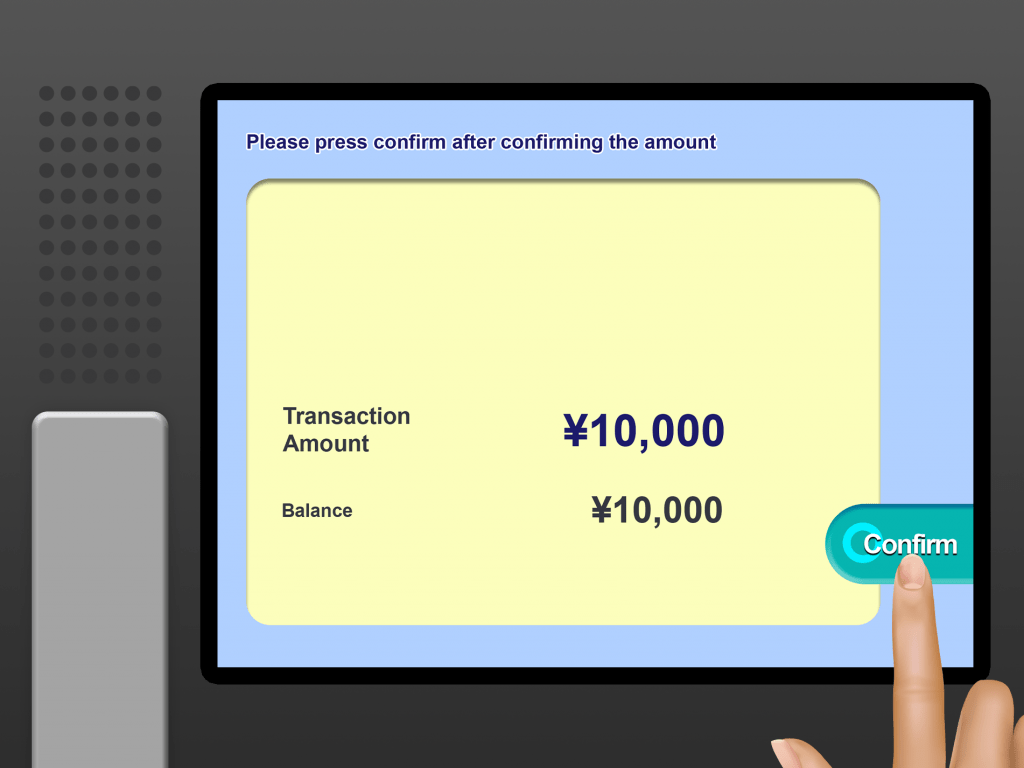
Don’t forget to collect your card and your receipt

2.7 Finish: Don’t forget to grab your DCOM Card, Receipt, and any change!
Instant Updates!

No more waiting! Your deposit reflects in your DCOM Account in real-time. Check your balance now via DCOM Money Express App to see your updated funds instantly.

3. How to withdraw Cash

Withdraw anywhere, anytime!

Get your cash when you need it! Use your DCOM Deposit Card at any Lawson Bank ATM for only ¥250. Withdraw up to ¥200,000 in one go!

Fast, secure, and hassle-free. That’s the DCOM Gold experience.

3.1. Select “English Guidance” on the screen.
3.2. Tap “Next.”
3.3. Insert your DCOM Card.
3.4. Select “Withdrawal.”
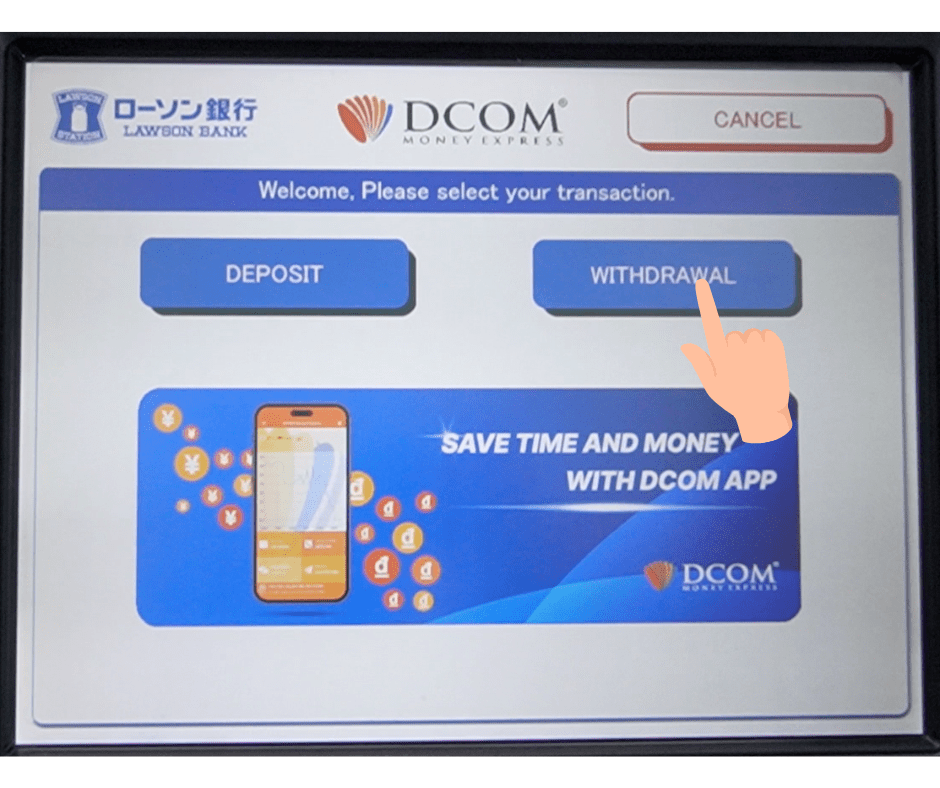
3.5. Enter your 4-digit PIN.
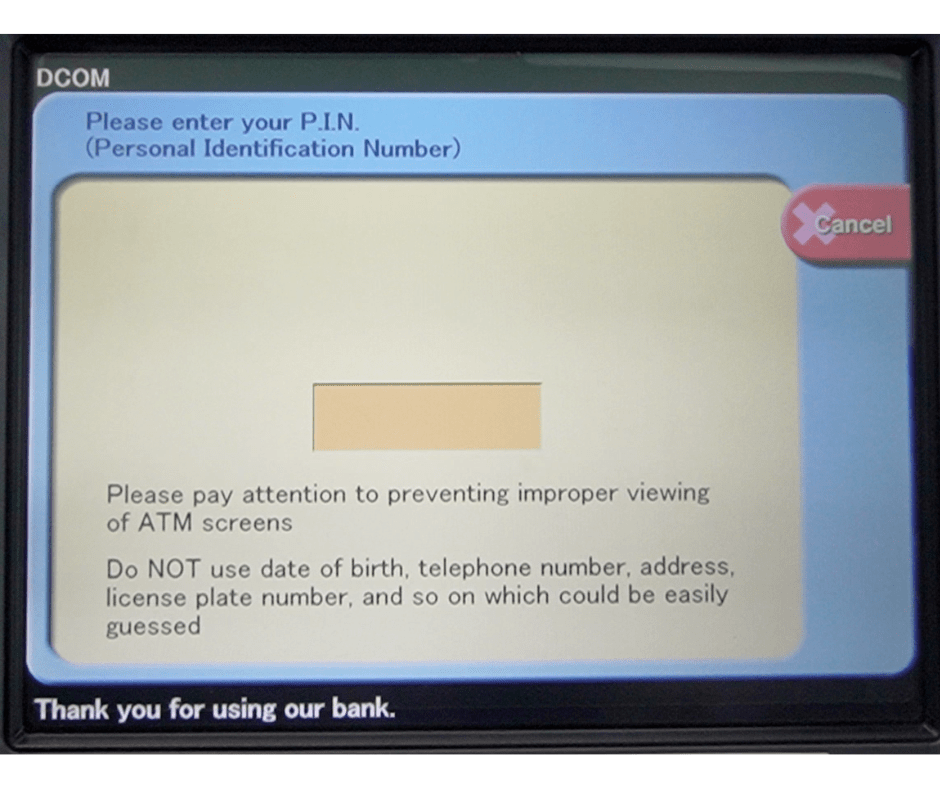
Forgot your PIN? You can easily reset it via the DCOM App.

f. Enter the amount you wish to withdraw and tap “Confirm.”
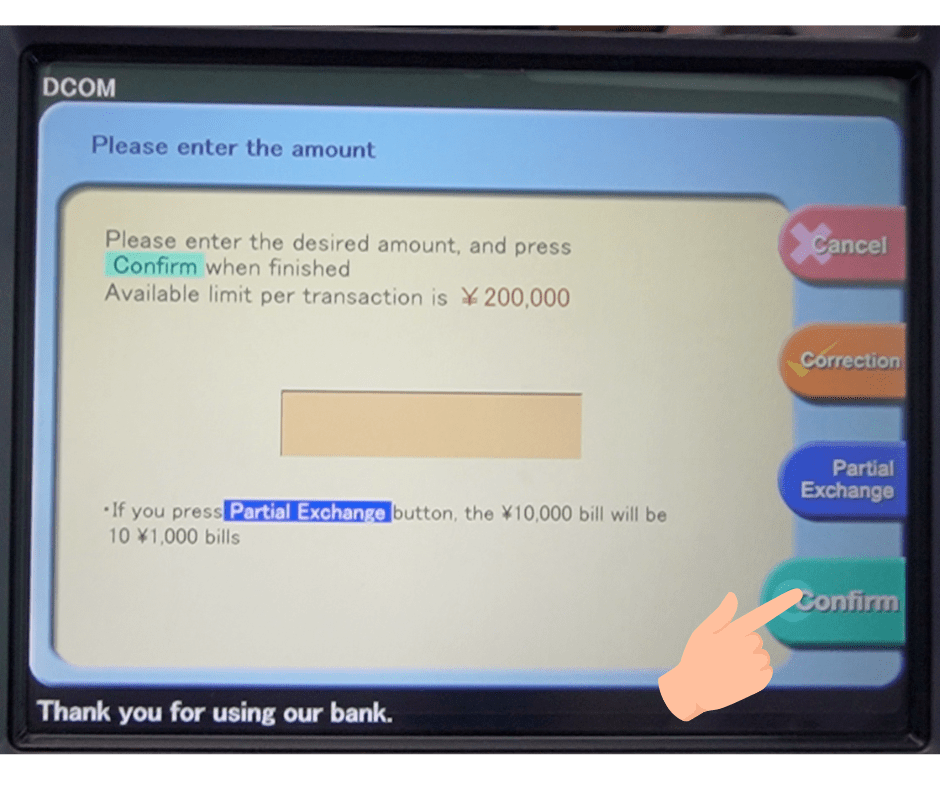
Withdraw up to ¥200,000 in one go!

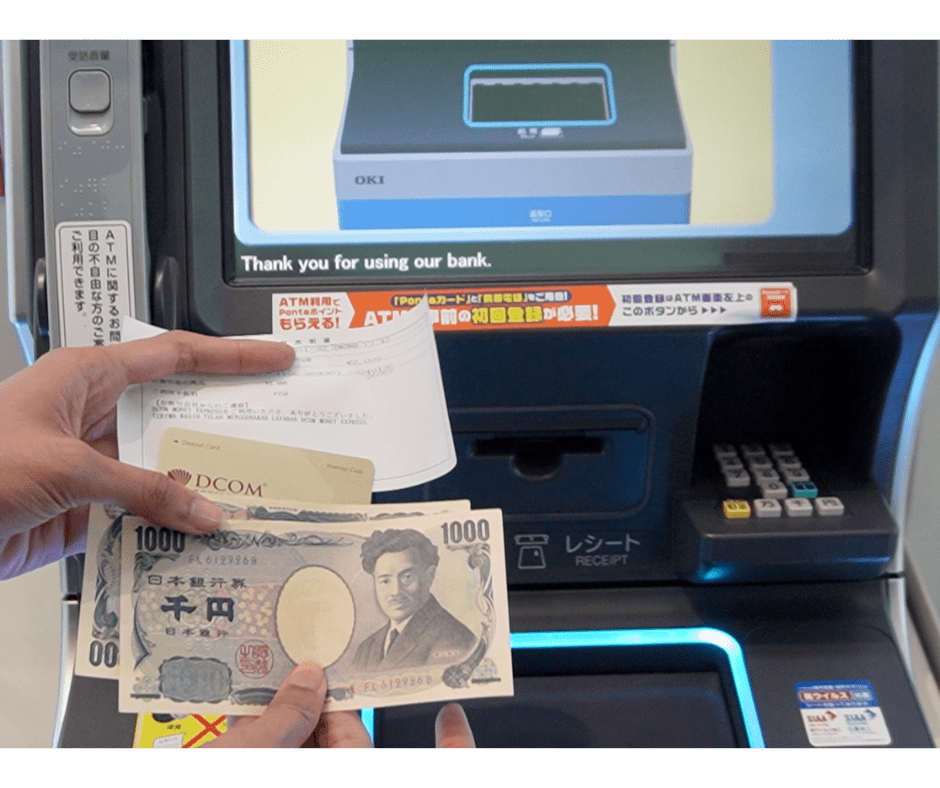
g. Collect your Cash, Card, and Receipt.
4. Set up/Change your PIN (for withdrawal)

You now have the power to withdraw money using the NEW DCOM Gold Card at any Lawson ATM.

To utilize this feature, you must first set up your PIN. Here’s how:
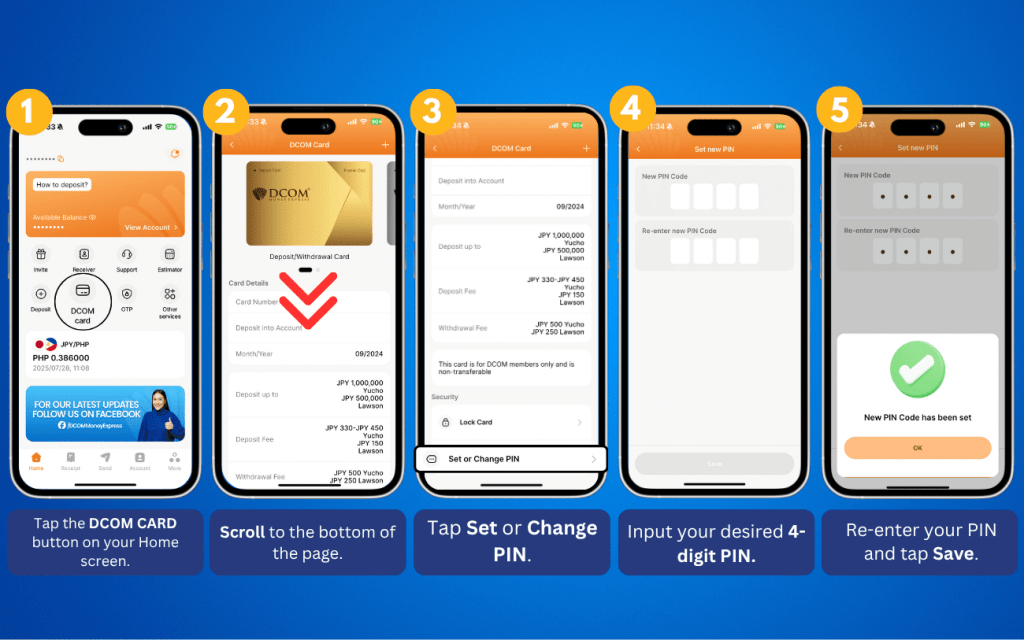
Using numbers associated with personal details such as your birthday or consecutive sequences like (1111, 2222, ~) are not allowed

5. Reset PIN code

Your security is our priority. If you suspect your PIN code has been compromised, you can quickly reset it using the DCOM App. Enjoy peace of mind knowing you can manage your card’s security anytime, anywhere.
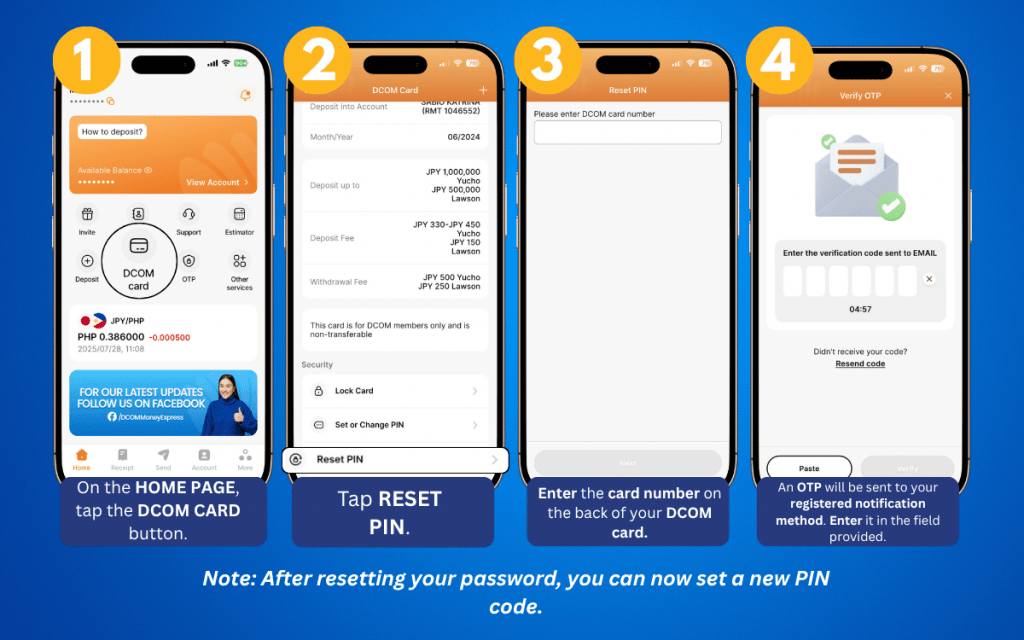
6. How to block cards

Your security, in your hands. With our latest update, you can instantly block a lost or stolen card no calls needed. Enjoy total control and peace of mind, anytime, anywhere.
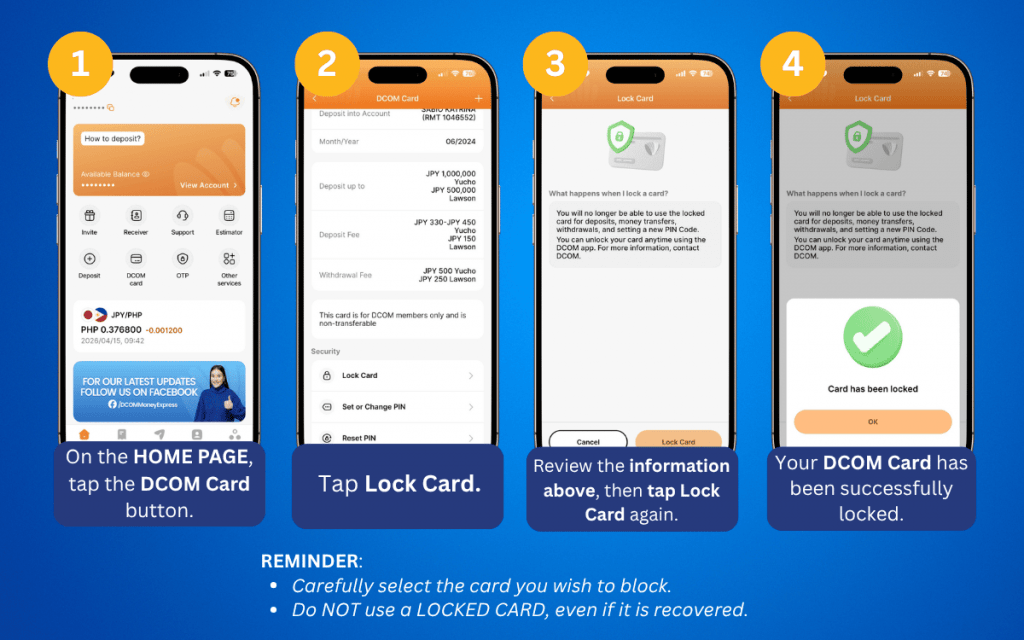
If you wish to request a replacement card, you can do so by:
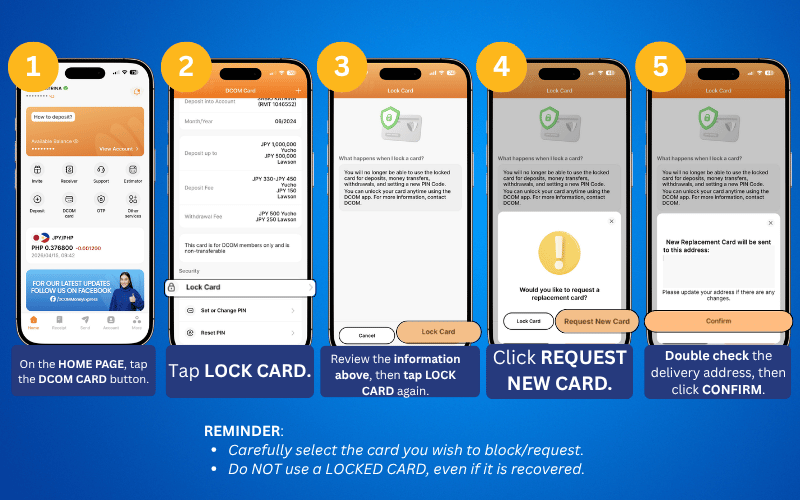
7. How to Unlock your DCOM card

Found your card? Follow these steps to unlock it:
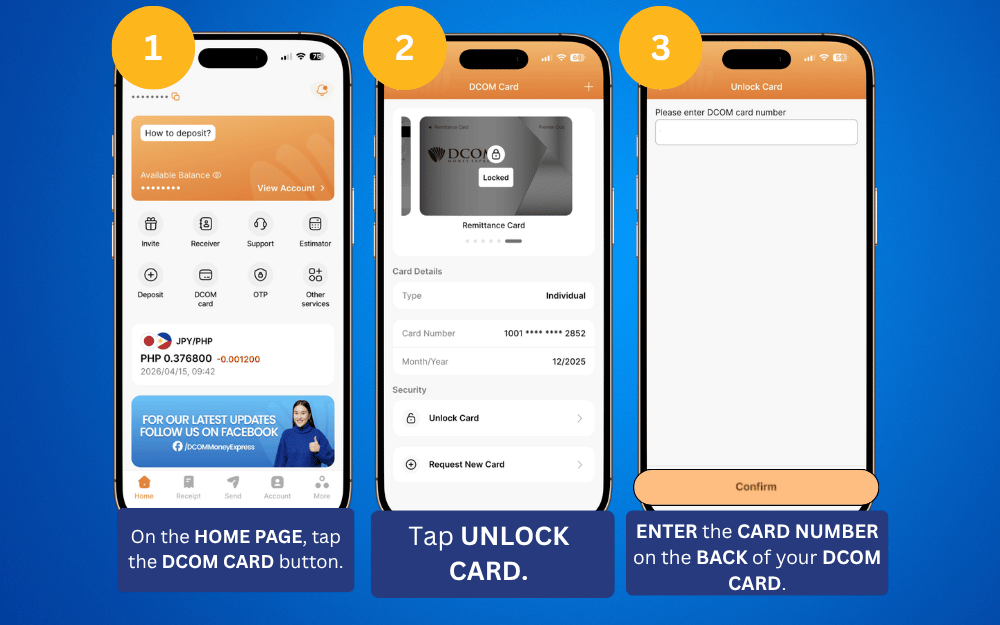
Meet your new DCOM Card: Faster. Better. Easier. 💳

Discover all the new things you can do in just a few taps. Encountered a glitch? Our support team has your back! We’re here to make every transaction as smooth as possible.

Try it today and experience the DCOM difference!

  • 0 0 Sagot
  • 4k Mga Panonood
  • 0 Tagasunod
  • 0
Sagot
    Mag-iwan ng sagot

    Mag-iwan ng sagot
    Pindutin ito para bawiin ang tugon.

    Mag-browse

    Sidebar

    Magtanong

    User Ranking

    DCOM Vietnam Help Center

    DCOM Vietnam Help Center

    • 0 Tanong
    • 1k Puntos
    DCOM Indonesia Help Center

    DCOM Indonesia Help Center

    • 0 Tanong
    • 336 Puntos
    DCOM Filipino Help Center

    DCOM Filipino Help Center

    • 37 Mga Katanungan
    • 321 Puntos
    DCOM Help Center

    DCOM Help Center

    • 1 Tanong
    • 206 Puntos
    DCOM Vietnam Help Center

    DCOM Vietnam Help Center

    • 0 Tanong
    • 172 Puntos
    • Popular
    • Answers
    • el_guapito

      Ilang araw bago pumasok ang padala ko via Account Deposit?

      • 10 Mga Sagot
    • el_guapito

      May bayad ba mag-request ng DCOM Direct to Receiver Card?

      • 7 Mga Sagot
    • el_guapito

      Hanggang anong oras po kayo today?

      • 20 Mga Sagot
    • el_guapito

      Ano ang MUFG Account ninyo?

      • 8 Mga Sagot
    • el_guapito

      Pwede ba makahingi ng resibo?

      • 7 Mga Sagot
    • DCOM Filipino Help Center
      DCOM Filipino Help Center nagdagdag ng sagot Good Day! Yes po, real-time po ang bawat transaksiyon natin… 01-11-2024 di 5:47 hapon
    • Camille
      Camille nagdagdag ng sagot Hi hinulpg lang ito nun Friday possible ba mareceive ko… 01-11-2024 di 5:46 hapon
    • DCOM Filipino Help Center
      DCOM Filipino Help Center nagdagdag ng sagot Good Day po! Pasensya na po ngunit ang serbisyo po… 01-11-2024 di 5:45 hapon
    • Merlyn Sadsad
      Merlyn Sadsad nagdagdag ng sagot Ilang araw po bago pumasok ang pera sa ATM ko… 01-11-2024 di 5:44 hapon
    • Elma
      Elma nagdagdag ng sagot Gamit ng asawa ko fron uk is remitly, tapos isend… 01-11-2024 di 5:43 hapon

    Mga Tag ng Tanong

    account deposit add receiver bank transfer dcom dcom account dcom app dcom card furikomi password receiver remittance remittance statement resibo ng remittance send money service fee

    Galugarin

    • HOMEPAGE
    • Bagong Member
    • DCOM Card
    • DCOM App
    • Settings ng OTP at Password
    • Service Fee at Exchange Rate
    • Remittance Statement
    • Send Money – Pera Padala
    • Receive Money – Pagtanggap
    • Send Additional Documents
    • At Iba Pang Guide

    Footer

    Tungkol sa


    DCOM Money Express is a money transfer service to more than 200 countries. D. COMMUNICATIONS, INC. is based in Tokyo, Japan. Operated under License No. 00001 issued by the Hokuriku Finance Bureau, the Ministry of Finance of Japan.

    HEAD OFFICE

    Address: 6F Across Shinkawa Bldg.,
    1-8-8 Shinkawa, Chuo-ku, Tokyo

    Hotline: 03-6661-2477
    Fax: 03-6661-9181
    E-mail: ph@sendmoney.co.jp

    DCOM NAGOYA BRANCH

    Address: 1B, 1F Nagoya Sakae Building,
    5-1 Buheicho, Higashi-ku, Nagoya-shi, Aichi

    Connect with us

    Copyright © 2021 D. Communications, Inc. All Rights Reserved.